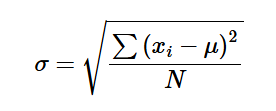

Designing and Implementing get_stats in PL/SQL
The get_stats function in the stats package provides a deterministic statistical engine for in-memory numeric datasets.
It does not operate directly on database tables, although data from tables can be passed to it by first being placed into an array.
Instead, it works with PL/SQL collections and produces a structured result containing:
- The Frequency Table
- A complete statistical summary
This blog post explains the design and implementation of that function.
Entry Points
The package supports the following ways to compute statistics:
If you already have data in an array, or have populated the array from a database table, call:
get_stats(p_array IN plsql_types.t_number_array)
Thin wrapper for array input, simply delegates to get_stats:
get_stats_array(p_array IN plsql_types.t_number_array)
If your data is a comma separated values string:
get_stats_list(p_list IN VARCHAR2)
This converts the string using function list_to_array and then calls get_stats_array.
If your data is in the table STATS_DATA:
get_stats_project(p_project_id IN stats_project.stats_project_id%TYPE)
This function collects data from table STATS_DATA for the specified project_id, loads it into an array and then calls get_stats_array.
All entry points ultimately route to the same core function, get_stats.
The Core Design Principle
The key architectural decision is this:
Build the Frequency Table once, then derive all statistics from it.
Instead of repeatedly scanning the original array, get_stats first transforms the dataset into a canonical distribution.
Step 1 - Populate the Frequency Table
The first operation inside get_stats is:
tb_frequency_table := populate_frequency_table(p_array);
populate_frequency_table performs the following:
- Validates input
- Rejects NULL values
- Sorts array into ascending order
- Compresses duplicates into (key, frequency) pairs
Example:
Input array: 1,1,2,2,2,4,5
| Frequency Table | |
|---|---|
| Key | Frequency |
| 1 | 2 |
| 2 | 3 |
| 4 | 1 |
| 5 | 1 |
From this point forward, all statistical calculations operate on this frequency table.
Step 2 - Calculate Summary Statistics
Once the frequency table has been populated, each statistic is computed independently using pure functions:
    rec_stats.sum_values      := frequency_table_sum(tb_frequency_table);
    rec_stats.n_total         := frequency_table_count(tb_frequency_table);
    rec_stats.distinct_n      := tb_frequency_table.COUNT;
    rec_stats.mean            := frequency_table_mean(tb_frequency_table);
    rec_stats.median          := frequency_table_median(tb_frequency_table);
    rec_stats.mode_values     := frequency_table_mode(tb_frequency_table); -- table of NUMBER
    rec_stats.lowest          := frequency_table_lowest(tb_frequency_table);
    rec_stats.highest         := frequency_table_highest(tb_frequency_table);
    rec_stats.range           := frequency_table_range(tb_frequency_table);
    rec_stats.variance_pop    := variance_pop(tb_frequency_table);
    rec_stats.variance_samp   := variance_samp(tb_frequency_table);
    rec_stats.stddev_pop      := stddev_pop(tb_frequency_table);
    rec_stats.stddev_samp     := stddev_samp(tb_frequency_table);
    rec_stats.iqr             := iqr(tb_frequency_table);
Each function:
- Accepts frequency table data of type t_frequency_table
- Performs a calculation
- Has no side-effects
- Does not re-build, re-sort, or change frequency table data
This makes the implementation predictable, and testable.
Step 3 - Populate the Result Structure
The function returns a composite structure:
  -- Get_stats uses this composite record to store the calculated
  -- statistics and frequency table from which they were generated.
  TYPE t_stats_result IS RECORD (
    stats       t_stats_summary,
    freq_tbl    t_frequency_table
  );
The underlying structures used for the frequency table, and statistics are defined in the package PLSQL_TYPES:
  TYPE t_frequency_row IS RECORD (
    key         NUMBER,
    frequency   PLS_INTEGER
  );

  TYPE t_frequency_table IS TABLE OF t_frequency_row;

  TYPE t_num_table IS TABLE OF NUMBER;

  -- Used by get_stats to return all statistics for frequency table
  -- Note this is nested, supporting multiple mode values in t_int_table
  TYPE t_stats_summary IS RECORD (
    sum_values      NUMBER,
    n_total         PLS_INTEGER,
    distinct_n      PLS_INTEGER,
    mean            NUMBER,
    median          NUMBER,
    mode_values     t_num_table,
    lowest          NUMBER,
    highest         NUMBER,
    range           NUMBER,
    variance_pop    NUMBER,
    variance_samp   NUMBER,
    stddev_pop      NUMBER,
    stddev_samp     NUMBER,
    iqr             NUMBER
  );
Returning both the statistics and frequency table from which they were derived in t_stats_result ensures:
- The frequency table is available for display
- Percentiles can be calculated repeatedly without needing to re-compute the frequency table
- Additional derived calculations can reuse the frequency table
Why Percentiles are Separate
Percentile functions are intentionally not embedded inside get_stats. They are defined separately:
  FUNCTION percentile_disc(
    p_frequency_table IN t_frequency_table,
    p_pct             IN NUMBER
  ) RETURN PLS_INTEGER;

  FUNCTION percentile_cont(
    p_frequency_table IN t_frequency_table,
    p_pct             IN NUMBER
  ) RETURN NUMBER;
This keeps responsibilities clean:
- get_stats computes the core_summary.
- Percentiles operate on the returned frequency table.
- The summary record remains stable and compact.
Complexity
Let:
- N = total number of elements in source array
- D = number of distinct values (rows in frequency table)
Then:
- Frequency table build: O(N log N)
- Mean, median, mode, variance, standard deviation: O(D)
- Percentile: O(D)
Once the frequency table is built, all operations are linear in distinct values only.
Example
In this example, a comma separated list of integers will be passed to get_stats_list which
returns the result in a record of type t_stats_result.
Run the following code in Oracle SQL Developer:
SET SERVEROUTPUT ON
ACCEPT p_list PROMPT "Enter a list of numbers separated by commas"
ACCEPT p_percentile NUMBER PROMPT "Percentile (number > 0 and < 1)?"

DECLARE
  v_stats_result plsql_types.t_stats_result;
BEGIN
  util_admin.log_message('Input list is: ' || '&p_list');
  v_stats_result := stats.get_stats_list('&p_list');
  stats.display_frequency_table(v_stats_result);
  stats.display_stats(v_stats_result,&p_percentile);
EXCEPTION
  WHEN OTHERS THEN
    util_admin.log_message('See error messages above.');
END;
You will be prompted to enter a list of numbers, followed by a percentile.
Enter a list of numbers separated by commas : 1,3,1,2,1,5,9,1,7,3,2
Percentile (number > 0 and < 1)? : 0.66
The results are displayed below:
Input list is 1,3,1,2,1,5,9,1,7,3,2
----------------------------------------------------------
FREQUENCY TABLE
----------------------------------------------------------
KEY=1.0000000000 Frequency=4
KEY=2.0000000000 Frequency=2
KEY=3.0000000000 Frequency=2
KEY=5.0000000000 Frequency=1
KEY=7.0000000000 Frequency=1
KEY=9.0000000000 Frequency=1
----------------------------------------------------------
STATISTICS
Sum=35.0000000000
N Total=11
Distinct N=6
Mean=3.1818181818
Median=2.0000000000
Mode 1 = 1.0000000000
Lowest=1.0000000000
Highest=9.0000000000
Range=8.0000000000
Variance Population=6.6942148760
Variance Sample=7.3636363636
Standard Deviation Population=2.5873180856
Standard Deviation Sample=2.7136021012
Interquartile Range=3.0000000000
Percentile Discrete ( 0.66)=3.0000000000
Percentile Continuous ( 0.66)=3.0000000000
Generate Stats from a CSV File
You can import raw data into Oracle from a CSV file, and generate statistics from that. Follow the link below
for more information.
Generating Statistics From a CSV File
Conclusion
get_stats defines a small, well-structured statistical application.
In a future blog we will develop an APEX application that uses these statistical functions.